
The other day I wrote about a list of top open source bpm / workflow solution. One of the mentioned solution is ProcessMaker.com – an open source business process management (BPM) and workflow software designed for small and mid-sized businesses (SMBs) and organizations.
I decided to give ProcessMaker a try just to check out the features and to find out if I could really automate a business process based on the community edition of ProcessMaker.
Some of my previous experience with BPM tools were Metastorm BPM as well as K2, both are proprietary and works on .NET platform.
If you ask me what’s my understanding of Business Process Management, I would say it’s all about automating business processes.
Most organizations have complex business processes which involves multiple parties to make a decision. A BPM tool will definitely assist and help to determine what and who should take an action based on a designed process map.
My ProcessMaker Review
 I started off by downloading ProcessMaker and attempted to set it up on my existing LAMP environment. It took me about 2-3 hours just to set it up since I wasn’t that familiar with tweaking Apache’s virtual host. Looking through their online setup guide as well as looking through the forum definitely helped.
My suggestion to those who are also planning to install ProcessMaker, if you’re not too familiar configuring and setting up the LAMP environment, try downloading the Windows Installer version instead. With this version, all you need to do is to run the setup file and there will be an installation wizard to help you set everything up. I tried this on another machine with Windows XP and ProcessMaker was installed successfully without any problems.
Once installed, I logged in. As usual, I was like, what is this for? Where should I start? etc?
This is what I did!
- Glanced through quickly the ProcessMaker Wiki
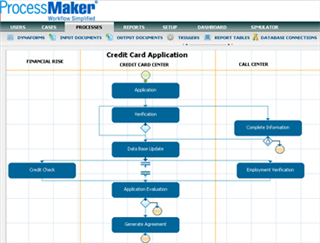
- Downloaded the Credit Card Application process and imported it to my local ProcessMaker.
- Tried creating users, processes, etc. Was having difficulty here since I didnt know what was really going on.
- Went through the ProcessMaker Demos. This was an important step as many of the questions that I had was answered through the demos. If the ProcessMaker people are reading this, I would suggest to reordering the demo’s from 1 – 7 rather than 7 – 1. 🙂
- Downloaded the Expense Report process and tweaked it further.
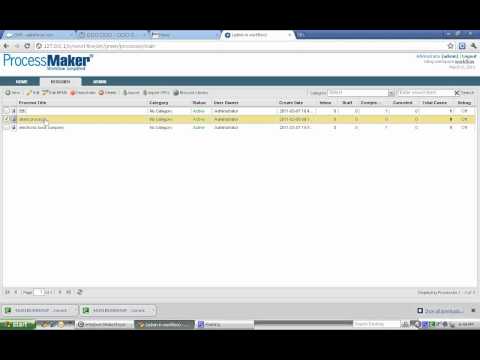
So the end result of my test, I managed to create my very own Claims Reimbursement Process based on tweaking the Expense Report sample. I gave it a run by logging in as the applicant to submit the claim followed by going in as the approver to approve the claim and lastly as the finance person to process the payment. All these were done and achieved in within 3 days of learning ProcessMaker.
There is still a lot for me to learn about ProcessMaker, but overall it was a good experience and I found out the following pros and cons:
Pros of ProcessMaker
- Everything from designing of the process to using the system is all web based. Need not install anything on the desktop.
- The functions and user interface are consistent thus making it easier to learn and apply.
- Lots of samples to download and learn from making it a truly open and transparent environment.
- Some moderators and users in the forum do provide help and tips for newbies. Rather than replying a short RTFM to the newbies, they would go the extra mile to explain and attempt to solve the problem.
Cons of ProcessMaker
- Since every is web based, the designing process can be a bit slower as compared to a desktop application. Also if you did a mistake like accidentally deleting something, you can’t press Ctrl + Z to undo the mistake.
- The number of active users in forum are still lacking. The knowledge base would be even better if there are more users and people asking and contributing.
Over the next few days, I will attempt to roll out the Claims Reimbursement Process to my office environment to fully test the system. From there on, I should be able to add even more pros and cons of ProcessMaker, and also share more experience. Hopefully in the long run, we can utilize ProcessMaker to the fullest to automate even more processes.
ProcessMaker Review
-
Usability
-
Pricing
-
Features



if you want to be able to turn your BPMN processes into running applications, we just released BizAgi Xpress BPM Suite. So go on, visit our web site at http://www.bizagi.com, download it (no questions asked) and experience the power and simplicity of BizAgi Xpress; it provides enterprise class functionality at very low cost!
If you want to deeply understand more about ProcessMaker, we run ProcessMaker classroom courses in the UK or Online Instructor-led all over the world.
Other comprehensive BPM services and training can be found at http://www.nobleprog.co.uk/bpm/consultancy
Online Instructor-led ProcessMaker Training: http://www.nobleprog.com/processmaker/training-courses
ProcessMaker Training in the UK: http://www.nobleprog.co.uk/processmaker/training
Hi, I would like to hear any more comments, on how trying to use the pm in real life (office env.)
I would like to know if i can pass receipt information from a web service i created into ProcessMaker for claim reimbursement where in the end, the manager will see there is a claim waiting for approval in his inbox?
hello,
am really really new at this, am trying to create a registry for my billboards, something which can let me know how many time a billboard advert has been changed, what it cost, when next a client will be paying…etc….can someone kindly guide me through this. especially the starting phase..thanks
A simple way to install the community edition is to run it in a Bit amp virtual machine. I could start it in 30 min.
The tool seems very promising. Demos help a lot. Seems there is an adding for Outlook.
For me, the tool is geared to small and medium enterprises with not too many people.
You define the process, the forms and the roles. With that you can start.